


Active Directory is one of the most important technologies in enterprise IT infrastructure.
If you have worked in a Windows-based organisation, even without realising it, you have probably interacted with Active Directory. It is often behind the login screen, the file share you access, the printer you connect to, the security group that gives you permission, and the policy that controls what your computer can or cannot do.
For many organisations, Active Directory is the foundation of identity, authentication, authorisation, device management, policy enforcement, and access control.
That is why understanding Active Directory is not only useful for system administrators. It is also important for security engineers, cloud engineers, infrastructure engineers, penetration testers, support engineers, and anyone working around enterprise systems.
Before installing a domain controller or designing a Windows Server environment, it is important to understand what Active Directory does, how it is structured, and why its design matters.
A well-designed Active Directory environment can make an organisation easier to manage and secure. A poorly designed one can become one of the biggest security risks in the business.
What Is Active Directory Domain Services?
Active Directory Domain Services, often called AD DS, is Microsoft’s directory service for managing users, computers, groups, policies, and other resources in a network.
Think of it as the central identity and access system for a Windows enterprise environment.
Instead of creating separate usernames and permissions on every computer or server, an organisation can use Active Directory to manage identities centrally.
AD DS can store and manage objects such as:
- user accounts
- computer accounts
- security groups
- printers
- organisational units
- domain controllers
- service accounts
- Group Policy Objects
- directory-enabled application data
For example, when an employee joins a company, an administrator can create a user account in Active Directory. That account can then be added to the right groups, given access to the right systems, and governed by the organisation’s security policies.
When the employee signs in to a domain-joined computer, Active Directory helps verify who they are and what they should be allowed to access.
This is why Active Directory is not just a database. It is a core part of how organisations control trust, identity, and access.
What Is a Domain Controller?
A domain controller is a server that runs the Active Directory Domain Services role.
It stores a copy of the Active Directory database and helps process authentication and authorisation requests in the domain.
When a user logs in, the domain controller helps verify the user’s identity. When a user tries to access a shared folder, internal application, printer, or network resource, the domain controller helps determine whether that user has permission.
In simple terms, a domain controller helps answer two important questions:
- Who are you?
- What are you allowed to access?
That makes the domain controller one of the most sensitive servers in a Windows environment.
If a normal workstation is compromised, the damage may be limited. But if a domain controller is compromised, the attacker may gain access to identities, permissions, policies, and systems across the organisation.
For this reason, domain controllers should be treated as high-value security assets.
They should be carefully protected, monitored, patched, backed up, and restricted to their specific role.
Why Active Directory Structure Matters
Active Directory has both logical and physical structures.
These structures help an organisation decide how users, computers, domains, locations, permissions, policies, and replication should be organised.
This matters because Active Directory is not only about creating user accounts. It is about designing a structure that supports administration, performance, security, and growth.
A good Active Directory structure helps with:
- access control
- administrative delegation
- policy management
- authentication performance
- replication efficiency
- identity governance
- security monitoring
- operational clarity
A weak structure can lead to:
- too many privileged users
- unclear ownership
- poor Group Policy design
- replication issues
- difficult troubleshooting
- excessive access
- weak separation between business units
- security blind spots
Active Directory design is therefore both an infrastructure decision and a security decision.
Active Directory Logical Structure
The logical structure of Active Directory describes how directory objects are organised.
For example, look at the figure below. You will see the forest root domain named serverroompro.com, with two child domains named Boston.serverroompro.com and Texas.serverroompro.com.
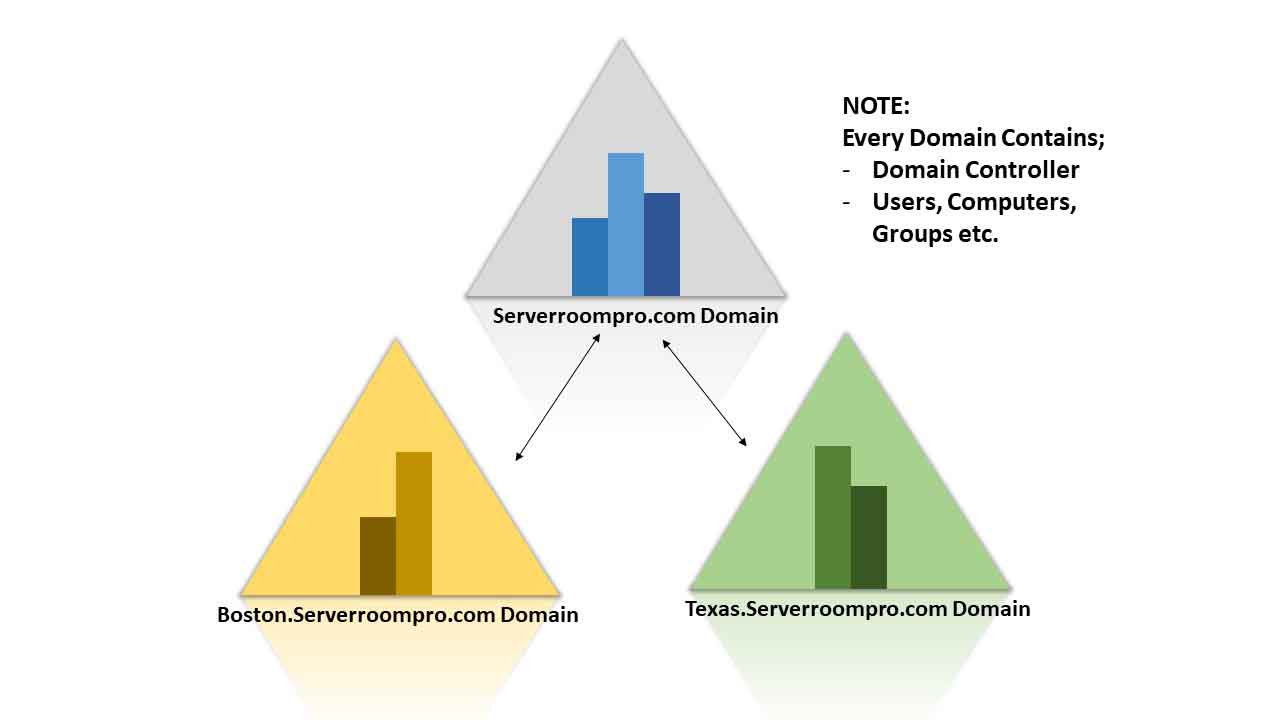
Please know that both the Serverrroompro.com domain (The Head Quarters) and the Texas domain are located in Texas being housed in a single office.
The major logical components include:
- forests
- trees
- domains
- organisational units
- objects
- schema
- partitions
Let’s break them down in a practical way.
Forest
A forest is the highest-level container in Active Directory.
It represents a complete Active Directory environment.
A forest can contain one or more domains, and those domains share a common:
- schema
- configuration
- global catalog
- trust structure
- directory design
For example, an organisation may have a forest root domain such as:
serverroompro.com
Inside that forest, it may also have child domains such as:
boston.serverroompro.comtexas.serverroompro.comThe forest is extremely important from a security perspective because it is often treated as the top-level security boundary in Active Directory.
If an attacker gains control of highly privileged forest-level accounts, they may be able to affect every domain inside that forest.
That is why forest-level administration should be tightly controlled.
Tree
A tree is a collection of domains arranged in a hierarchical structure.
Domains in the same tree share a continuous DNS namespace.
For example:
serverroompro.com
boston.serverroompro.com
texas.serverroompro.com
Here, boston.serverroompro.com and texas.serverroompro.com are child domains of serverroompro.com.
The parent and child domains are connected in a hierarchy.
Trees are useful when an organisation needs multiple domains but still wants them to belong to the same namespace.
However, in modern environments, it is usually better to avoid unnecessary domain complexity unless there is a real administrative, legal, geographical, or security reason.
A simpler design is often easier to manage and secure.
Domain
A domain is a logical grouping of Active Directory objects that share a common directory database, security policies, and trust relationships.
A domain can contain:
- users
- computers
- groups
- service accounts
- domain controllers
- organisational units
- Group Policy Objects
Domains are often used as administrative boundaries.
For example, an organisation may have one domain for the whole business. Another organisation may use separate domains for regions, subsidiaries, or business units.
A domain helps administrators manage identities and access within a defined boundary.
However, creating more domains also increases complexity. Each additional domain introduces more administration, more trust relationships, more replication considerations, and more security decisions.
The best design is not always the most complex design. The best design is the one that supports the organisation’s operational and security needs clearly.
Organisational Unit
An Organisational Unit, commonly called an OU, is a container used to organise objects inside a domain.
OUs can contain:
- users
- groups
- computers
- service accounts
- other OUs
For example, an organisation may create OUs such as:
Finance
Human Resources
Engineering
Servers
Workstations
Service Accounts
OUs are useful because they help administrators organise objects and apply management rules.
They are commonly used for:
- applying Group Policy
- delegating administration
- organising departments
- separating servers from workstations
- managing user groups
- structuring service accounts
- simplifying operations
For example, helpdesk staff may be given permission to reset passwords only for users in a specific OU. Regional IT staff may be allowed to manage computers in their region without being given full domain admin privileges.
This is where Active Directory becomes powerful. You can delegate administration at the right level instead of giving everyone broad access.
Objects
An object is a basic unit inside Active Directory.
Examples of Active Directory objects include:
- user accounts
- computer accounts
- group accounts
- printers
- contacts
- service accounts
Each object has attributes.
For example, a user object may include attributes such as:
- first name
- last name
- username
- email address
- department
- phone number
- group membership
- account status
- password settings
A computer object may include information about a domain-joined machine.
A group object may be used to assign access to shared folders, applications, or systems.
Objects are the practical building blocks of Active Directory.
They represent the people, systems, and resources that administrators manage every day.
Schema
The schema defines what types of objects can exist in Active Directory and what attributes those objects can have.
For example, the schema defines what a user object is and what information can be stored about that user.
A user object may have attributes such as:
- first name
- last name
- display name
- email address
- department
- group membership
The schema is extensible, which means it can be modified or extended.
However, schema changes should be handled carefully. A schema update can affect the entire forest, so it should never be treated casually.
In enterprise environments, schema changes should be tested, documented, approved, and backed up before implementation.
Partition
A partition is a logical section of the Active Directory database.
Partitions help Active Directory organise and replicate different types of directory information.
Common partitions include:
- schema partition
- configuration partition
- domain partition
- application partition
Partitions are important because not all directory data needs to be replicated in the same way or to the same places.
For example, domain-specific information is replicated among domain controllers in that domain, while forest-wide information needs to be available more broadly.
This helps Active Directory manage replication more efficiently.
Active Directory Physical Structure
The physical structure of Active Directory describes how domain controllers, sites, and network locations are arranged.
The major physical components include:
- domain controllers
- global catalog servers
- read-only domain controllers
- sites
- subnets
The physical structure matters because Active Directory is not only about logical organisation. It also needs to work efficiently across real networks, offices, data centres, and geographic locations.
Domain Controller
A domain controller stores and manages a copy of the Active Directory database.
It performs important functions such as:
- authenticating users
- authenticating computers
- processing logons
- enforcing security policies
- applying Group Policy
- replicating directory data
- supporting access to domain resources
Because domain controllers sit at the centre of identity and access, they should be secured carefully.
Good domain controller security includes:
- limiting administrator access
- avoiding unnecessary software installation
- applying security patches
- monitoring authentication events
- protecting backups
- restricting interactive logons
- securing physical access
- using strong auditing
- reviewing privileged groups regularly
A domain controller should not be treated as a general-purpose server.
It is a critical security system.
Global Catalog Server
A Global Catalog Server stores a partial, read-only copy of objects from all domains in the forest.
Its purpose is to make searches faster across domains.
For example, if a user or application needs to find an object in another domain, the global catalog helps locate that object without querying every domain in the forest.
Global Catalog Servers are especially useful in multi-domain environments.
They support:
- forest-wide searches
- logon processes
- object lookup
- application directory queries
In a small environment with one domain, the global catalog may not be something administrators think about often. But in larger environments, it becomes important for performance and availability.
Read-Only Domain Controller
A Read-Only Domain Controller, or RODC, is a domain controller that hosts a read-only copy of the Active Directory database.
RODCs are useful in locations where physical security may be weaker, such as branch offices.
Because the database is read-only, changes cannot be made directly on the RODC.
This reduces risk if the server is compromised or stolen.
RODCs can be useful for:
- branch offices
- remote sites
- locations without dedicated senior administrators
- environments where physical access cannot be fully controlled
However, an RODC still needs proper security.
It still participates in authentication and still contains sensitive directory information. It should not be ignored simply because it is read-only.
Site
An Active Directory site represents a group of well-connected IP subnets.
Sites help Active Directory understand network topology.
They are used to control:
- replication traffic
- authentication traffic
- domain controller selection
- service location
- network efficiency
For example, imagine an organisation with offices in Texas and Boston.
If the Texas office and headquarters are connected by a high-speed network, they may belong to the same Active Directory site.
If Boston is connected through a slower WAN link, it may make sense to create a separate site for Boston.
This helps Active Directory make better decisions about which domain controller should handle authentication and how replication should happen.
Sites are especially important in organisations with multiple offices, cloud networks, data centres, or international locations.
A Practical Example of Active Directory Design
Let’s use a simple example.
An organisation has a main domain:
serverroompro.comIt also has two child domains:
boston.serverroompro.com
texas.serverroompro.com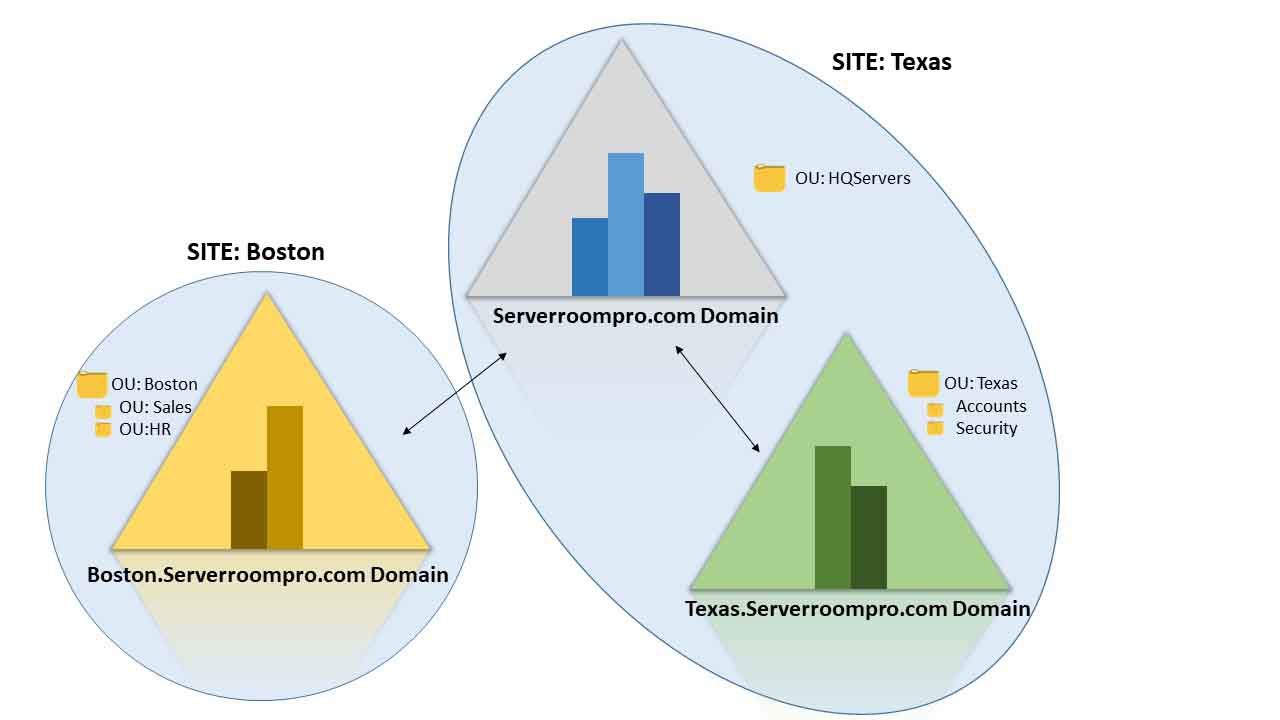
In this structure:
serverroompro.comis the forest root domainboston.serverroompro.comis a child domaintexas.serverroompro.comis another child domain
Now imagine that headquarters and the Texas office are located close to each other and connected through a high-speed network. They may be grouped into one Active Directory site.
Boston, however, connects through a slower WAN connection. It may be better placed in a separate site.
This design helps reduce unnecessary replication traffic and improves authentication performance.
It also supports delegation.
For example:
- a Texas administrator may manage objects in the Texas domain
- a Boston administrator may manage objects in the Boston domain
- a senior administrator may manage forest-level settings
- helpdesk staff may manage only a specific OU
This is how Active Directory supports both central control and delegated administration.
Delegation in Active Directory
Delegation is one of the most useful features of Active Directory.
It allows an organisation to give specific administrative responsibilities to specific users without giving them full control over everything.
For example:
- helpdesk staff may reset passwords for users in one OU
- regional IT staff may manage local computers
- application owners may manage groups for a specific system
- security administrators may control privileged access groups
This supports the principle of least privilege.
Instead of giving every support engineer domain admin rights, you can give them only the permissions they need.
This reduces risk and makes the environment easier to govern.
Poor delegation, however, can become dangerous.
If too many users have too much access, attackers can abuse those permissions during a compromise. That is why delegation should be reviewed regularly.
Active Directory and Security
Active Directory is not just an IT administration platform. It is one of the most important security systems in a Windows enterprise environment.
If Active Directory is compromised, attackers may gain access to:
- user accounts
- administrator accounts
- privileged groups
- servers
- workstations
- file shares
- applications
- cloud-connected identities
- business-critical systems
This is why many real-world attacks focus on Active Directory.
Attackers often try to move from a single compromised user account to broader access across the domain.
Common Active Directory security risks include:
- weak passwords
- stale user accounts
- too many privileged users
- excessive domain admin usage
- insecure service accounts
- poor group management
- weak delegation
- misconfigured Group Policy
- exposed domain controllers
- lack of monitoring
- insecure trust relationships
- poor backup and recovery planning
Securing Active Directory is not a one-time task. It is a continuous discipline.
Active Directory Security Best Practices
A secure Active Directory environment should be built around strong identity governance, least privilege, monitoring, and operational discipline.
1. Protect Privileged Accounts
Privileged accounts should be limited, monitored, and used only when necessary.
Administrators should use separate accounts for administrative tasks instead of using their normal everyday user accounts.
2. Apply Least Privilege
Users should only have the permissions they need to perform their work.
Avoid giving broad access when OU-level delegation or group-based access would be enough.
3. Review Groups Regularly
Security groups control access to systems and data.
Review group memberships regularly, especially for privileged groups such as Domain Admins, Enterprise Admins, Account Operators, and Server Operators.
4. Secure Domain Controllers
Domain controllers should be dedicated to their role.
They should not be used for normal browsing, file storage, unrelated applications, or general-purpose workloads.
5. Monitor Authentication Activity
Security teams should monitor:
- failed logins
- account lockouts
- privileged logons
- group membership changes
- suspicious authentication patterns
- unusual administrative activity
6. Manage Service Accounts Carefully
Service accounts are often overlooked.
They should have only the permissions they need, use strong secrets, and be reviewed regularly.
Where possible, organisations should use managed service accounts.
7. Maintain Group Policy Hygiene
Group Policy is powerful, but poor Group Policy design can create security and operational issues.
Review policies regularly and remove outdated, duplicated, or conflicting settings.
8. Plan for Recovery
Active Directory recovery planning is critical.
Backups should be protected, tested, and available in case of ransomware, corruption, accidental deletion, or domain compromise.
Common Active Directory Misconfigurations
Some Active Directory weaknesses are very common.
Examples include:
- too many Domain Admins
- unused privileged accounts
- weak password policies
- no account lockout policy
- old computer accounts
- service accounts with excessive privileges
- passwords stored in scripts
- poor OU structure
- unmanaged local administrator passwords
- legacy protocols still enabled
- inadequate audit logging
- unmonitored domain controller activity
These issues may seem small individually, but together they can create serious attack paths.
A mature Active Directory environment requires continuous review, not just initial configuration.
Why Active Directory Knowledge Still Matters
Even as organisations adopt cloud platforms, SaaS applications, and modern identity providers, Active Directory remains widely used.
Many environments still depend on AD DS for:
- domain-joined Windows devices
- internal applications
- file servers
- legacy systems
- hybrid identity
- Microsoft Entra ID synchronisation
- administrative access
- authentication and authorisation
This makes Active Directory knowledge valuable for many roles, including:
- system administrators
- security engineers
- infrastructure engineers
- cloud engineers
- support engineers
- penetration testers
- incident responders
- identity architects
Active Directory sits at the intersection of infrastructure, identity, and security.
If you understand AD properly, you understand how many enterprise environments actually work underneath the surface.
Final Thoughts
Active Directory remains one of the most important foundations of enterprise infrastructure.
It helps organisations manage users, computers, groups, policies, permissions, and access to resources.
To understand Active Directory well, you need to understand both its logical and physical structure.
The logical structure includes:
- forests
- trees
- domains
- organisational units
- objects
- schema
- partitions
The physical structure includes:
- domain controllers
- global catalog servers
- read-only domain controllers
- sites
- subnets
A well-designed Active Directory environment improves administration, security, performance, and scalability.
A poorly designed or poorly secured Active Directory environment can become a major business risk.
That is why Active Directory should not be treated as just another Windows Server feature. It should be treated as a critical identity and security platform.
If you are building a career in cybersecurity, infrastructure, DevOps, cloud, or enterprise IT, understanding Active Directory is still one of the most valuable foundations you can have.
Discussion
Comments
Join the conversation below.