

While deploying a web app like React, Angular or Node projects using Google cloud, you might come across this error after pushing your app from a docker container to gcr.io (Google cloud repository)
After tracing the logs, i realised its a platform related problem and you must have built your docker image using the code below;
docker build -t {project-name} .The code above works well on an intel system when you push to Google Cloud. but not on Apples M1, sadly 🙁
You will get an error saying:
Cloud Run: “Failed to start and then listen on the port defined by the PORT environment variable.”
this happens when building on Cloud run
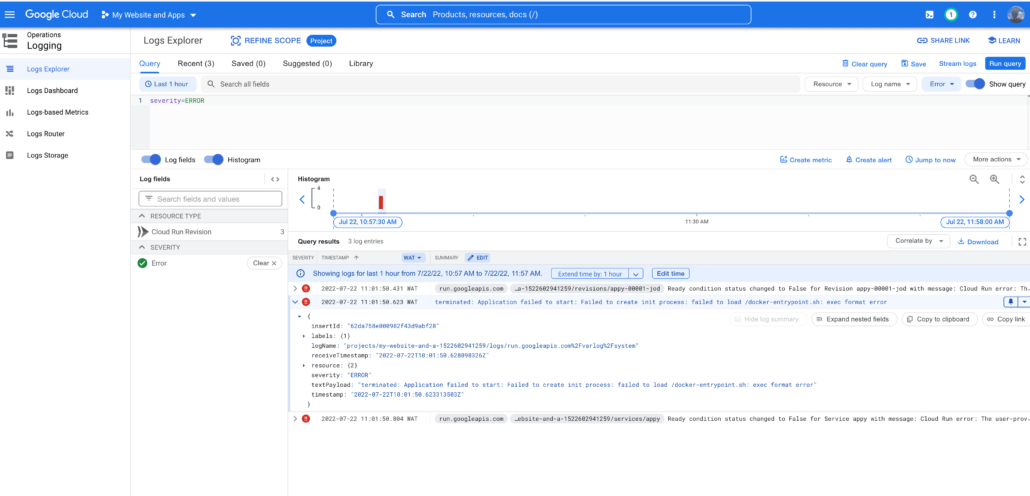
Solution to the Cloud run Failed to start issue
Use the following command to build your docker image;
docker buildx build --platform linux/amd64 -t {project-name} .Voila! 😀
Hello,
I am encountering the same issue, but even using buildx I receive the following error: The user-provided container failed to start and listen on the port defined provided by the PORT=8080 environment variable.
Do you have any ideas on how to solve this problem?
Hi Daniel, is this a new container or an existing project? I’ll suggest you use a different gcr
I have same problem. What gcr will you recommend
Hi, can you please tell me why it works? Thanks for the solution it works for me!
Thank you. It solved my problem as well.
I didn’t investigated deeply but the problem is exactly about the operational system that you create the image. It is also specified at the Cloud Run documentation as well. https://cloud.google.com/run/docs/troubleshooting. See
Verify that your container image is compiled for 64-bit Linux as required by the container runtime contract.
Note: If you build your container image on a ARM based machine, then it might not work as expected when used with Cloud Run. To solve this issue, build your image using Cloud Build.
I believe using a builder step in the docker file could be a remedy for it. https://docs.docker.com/build/building/multi-stage/
I’ve been looking everywhere for this answer. Just spent hours trying to figure out why my M1 Macbook was having issues deploying. This was super helpful, thank you!
Hi there, I’m having this issue and it’s frustrating. I’m using a public docker image in docker hub and NOT creating any image.
When trying this image on my local machine it works fine and runs the application as expected on port 5001.
But when I deploy the container service(sidecar) on cloud run, I get the error.
Please help.